


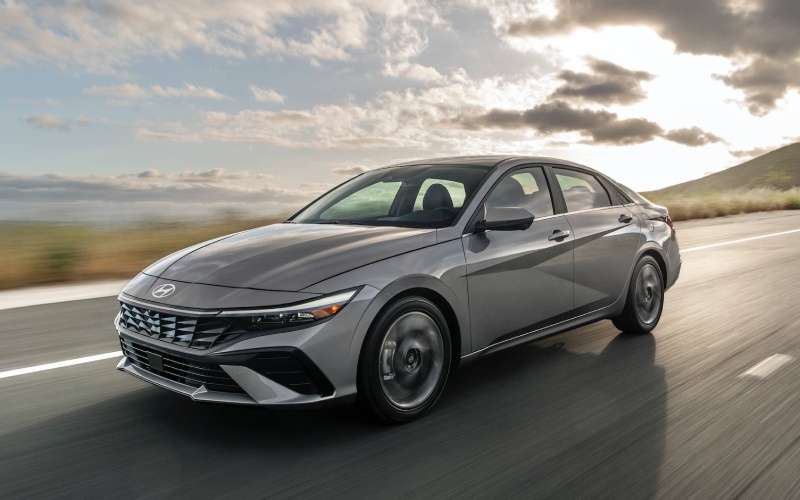
Glassman Hyundai – Hyundai Digital Key 2 Touch Makes Commuting Smoother around Detroit, MI
Hyundai Digital Key 2 Touch turns your compatible smartphone into the kind of everyday convenience you notice from the moment you head out the door. Available on the 2026 Elantra, it lets you unlock the doors and start the engine using your phone, and it supports secure key sharing with family or trusted friends via text. Even better, you can add your car key to Apple Wallet®, Google Wallet, or Samsung Pass for a native experience that feels as simple as tapping your phone. For busy Detroit, MI commuters juggling meetings, gym stops, and quick errands, it means no more digging through a bag for a fob and fewer interruptions as you move through your day.
Beyond the basics, Digital Key 2 Touch is thoughtfully woven into a connected ecosystem. Paired with Bluelink+, you can remotely check status, lock and unlock, and precondition the cabin on select models. Combine that with the Elantra’s available wireless device charging and Wi-Fi hotspot capability, and you build a daily workflow that keeps your essentials charged, your cabin comfortable, and your routine effortless. It is more than a party trick—it is foundational tech designed to save time and reduce friction for real-world driving in and around Detroit.
- Phone-as-key simplicity: Use your compatible smartphone to unlock, start, and get moving without reaching for a traditional fob.
- Shareable access: Send a secure, time-bound key to trusted drivers—perfect for family schedules or visiting guests.
- Wallet integration: Add your key to Apple Wallet®, Google Wallet, or Samsung Pass for native, tap-to-go convenience.
- Everyday security: Keep control with permissions you can grant and revoke, maintaining confidence about who has access.
- Connected routine: Pair with Bluelink+ to remotely check status and plan departures for smoother mornings.
Real-life scenarios underscore the benefit. Picture wrapping up a late shift downtown and walking to your Elantra with your phone in hand—tap, start, and you are headed home without fumbling for keys. Or imagine sharing access with a partner who needs the car for a quick school drop-off—no key handoff required, and you can update permissions anytime. For apartment dwellers and parking structure regulars, the system eliminates repeated in-and-out key juggling, delivering a streamlined rhythm that feels second nature after a day or two.
Digital Key 2 Touch complements the Elantra’s broader tech suite. Standard wireless Android Auto™ and Apple CarPlay® on the 8-inch display make routines easy from the first drive, and the available 10.25-inch touchscreen with navigation and 10.25-inch digital instrument cluster create a nearly seamless, high-visibility command center. Add the reassurance of Hyundai SmartSense—standard features like Forward Collision-Avoidance Assist with Pedestrian Detection, Lane Keeping Assist, and Rear Cross-Traffic Collision-Avoidance Assist—and your daily experience becomes both convenient and confidently supported by driver assistance you can feel.
If you are wondering about setup, it is designed to be straightforward. After pairing your compatible phone, you can add the key to your mobile wallet and test tap-to-unlock at the driver’s handle. From there, sharing access is managed within the app—ideal if a family member needs the car for a weekend errand list or if you are coordinating carpooling to an event in the city. And if plans change, simply adjust or revoke permissions. It is flexibility that respects your time and your schedule.
When you are ready to see how Hyundai Digital Key 2 Touch fits your routine, schedule a hands-on demo in the 2026 Elantra and bring your compatible device. One session is usually all it takes to understand how well the feature meshes with your day, from weekday commutes to weekend plans. Glassman Hyundai, serving Waterford, Warren, and Detroit, can also walk you through complementary tech like Bluelink+, wireless device charging, and available Wi-Fi hotspot capability so you see the whole system working together.
Frequently Asked Questions:
Do I still get a physical key if I have Digital Key 2 Touch?
Yes. You will have traditional access options in addition to phone-as-key functionality so you can choose what works best day to day.
Can I limit the time someone has access to my Elantra?
Yes. You can set and adjust access permissions and revoke them at any time, giving you clear control over shared keys.
What happens if my phone battery runs low?
Keep a backup access method handy, and take advantage of the Elantra’s available wireless device charging to help maintain charge during drives.
Is setup complicated?
Setup is designed to be guided and user-friendly—pair your compatible device, add the key to your mobile wallet, and test tap-to-unlock to confirm everything is working.
Request more 2026 Hyundai Elantra information
Connect with us


- Hyundai Auto Service & Parts
- Hyundai Brake Repair
- Hyundai Dealer
- Hyundai Dealership
- Hyundai Elantra
- Hyundai Elantra Hybrid
- Hyundai IONIQ 5
- Hyundai IONIQ 5 N
- Hyundai IONIQ 6
- Hyundai IONIQ 9
- Hyundai KONA
- Hyundai OEM Parts
- Hyundai Oil Changes
- Hyundai Palisade
- Hyundai Parts
- Hyundai Santa Cruz
- Hyundai Santa Fe
- Hyundai Santa Fe Hybrid
- Hyundai Service
- Hyundai Sonata
- Hyundai Sonata Hybrid
- Hyundai Specials
- Hyundai Tires
- Hyundai Tucson
- Hyundai Tucson Hybrid
- Hyundai Tucson Plug-in Hybrid
- Hyundai Venue
- Premier Auto Dealer
Categories
Glassman Hyundai

Address
28000 Telegraph Road
Southfield, MI 48034
Phone
- Sales 248-581-4820248-581-4908
- Service 248-581-4729
- Parts 248-581-4997
| Monday | 9:00AM - 8:00PM |
| Tuesday | 9:00AM - 6:00PM |
| Wednesday | 9:00AM - 6:00PM |
| Thursday | 9:00AM - 8:00PM |
| Friday | 9:00AM - 6:00PM |
| Saturday | 10:00AM - 4:00PM |
| Sunday | Closed |
| Monday | 7:30AM - 6:00PM |
| Tuesday | 7:30AM - 6:00PM |
| Wednesday | 7:30AM - 6:00PM |
| Thursday | 7:30AM - 6:00PM |
| Friday | 7:30AM - 6:00PM |
| Saturday | 8:00AM - 2:00PM |
| Sunday | Closed |
| Monday | 7:30AM - 6:00PM |
| Tuesday | 7:30AM - 6:00PM |
| Wednesday | 7:30AM - 6:00PM |
| Thursday | 7:30AM - 6:00PM |
| Friday | 7:30AM - 6:00PM |
| Saturday | 8:00AM - 2:00PM |
| Sunday | Closed |